
What are the common problems with robotic vacuum cleaners and how to fix them?
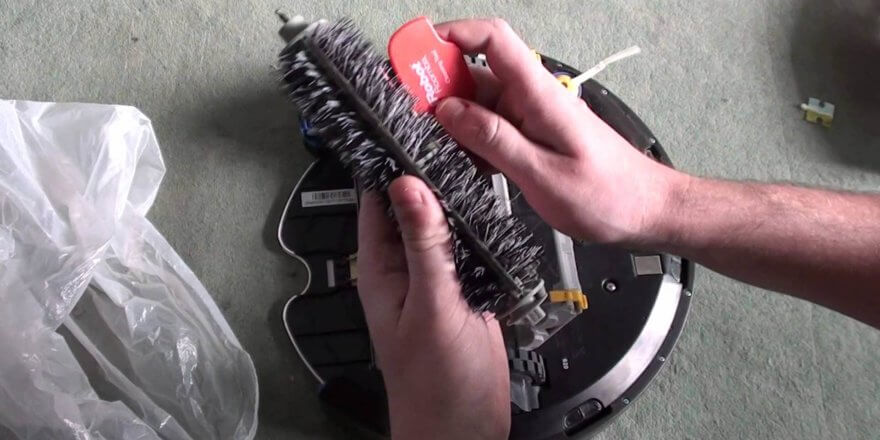
Robot vacuum cleaners are increasingly used these days to help homeowners keep their homes clean. However, almost every owner has experienced at least one problem: their robot vacuum suddenly starts making noise, creaks, won't turn on, won't charge, won't connect to Wi-Fi (if it's a high-tech model with smartphone control), or has other issues. Today, we'll look at the most common robot vacuum cleaner problems, their causes, and how to fix them yourself.
It doesn't work
The most common complaint users of this type of equipment hear is that their robot vacuum cleaner isn't working. This could mean anything. We'll look at several cases where the robot won't turn on or has stopped working on a particular type of flooring, and how to fix these issues.
If the device doesn't turn on with the power button, the problem may be a dead battery. What should you do in this case? First, place the robot vacuum cleaner on the docking station and leave it there until the battery is fully charged. Make sure the charging base is properly connected to the power outlet: check the power cord and plug are connected to the outlet, and ensure there is power at the outlet.
If the robot cleaner still does not turn on and the red light is on, then the cause is probably a faulty battery.
If the robot vacuum cleaner does not respond to the buttons on the remote control and does not start, you should check the batteries inside the remote control and replace them if necessary.
Sometimes, when cleaning all types of flooring, devices designed for cleaning all types of flooring perform poorly or bounce on the carpet. This malfunction is typical for iClebo robotic vacuum cleaners. This indicates a faulty rubber squeegee due to a manufacturing defect, damage, or dry rubber. In this case, the solution is to replace the squeegee with a new one.
Additionally, a robot vacuum cleaner designed exclusively for dry cleaning may not work if it accidentally sucks in water. To prevent damage, follow these steps:
- turn off the power, remove the dust collector, clean and wipe dry;
- remove existing filters and dry;
- remove, clean off any tangled hair, wool and dust, wipe with a dry cloth and after it has completely dried, put it back;
- Dry the device itself thoroughly, make sure that the mounting board is dry;
- turn on the power.
It doesn't charge.
Owners often notice that their robot vacuum cleaner is having trouble charging, not holding a charge for the entire cleaning cycle, or not charging at all.
As we described above, if your robot vacuum suddenly stops charging from the base or won't turn on from the power outlet, it's possible the battery is faulty. Even lithium-ion and lithium-polymer batteries wear out after 2-3 years and begin to hold a charge poorly, with the robot quickly losing charge even after a full charge. Therefore, if your battery is draining quickly or you see other signs of deterioration, simply replace it with a new one.
If you're unsure about the battery, it's possible the charging port on the docking station is broken, the charging cable itself is faulty, or the base board is at fault. Although rare, it's also possible that the control board in the robot itself is faulty. This could cause the robot vacuum to fail to charge. To fix the problem, thoroughly inspect the device for mechanical damage, diagnose it, and repair any damaged components. It's also a good idea to clean the charging contacts to ensure a better connection between the robot and the base.
Doesn't see the base
It also happens that a robot vacuum cleaner copes with all its functions perfectly, cleans cleanly and efficiently, but has difficulty returning to charge or repeatedly fails to find the base.
To figure out why the robot isn't driving to the base on its own and is having trouble finding it, you need to take the following steps:
- Make sure you've removed the protective film from the dock's infrared panel. Check that the sensors aren't covered or dirty, and that there are no foreign objects on the bumper.
- Visually inspect the docking station and cord for mechanical damage.
- In some cases, the robot vacuum cleaner cannot enter the base because the cleaning process in normal mode was started not from the base, but from another area of the room.
- If the robot vacuum cleaner can't see the base, it's not necessarily broken. The docking station may simply be installed incorrectly. Ensure there are no obstructions within half a meter on either side of the base, and find the optimal location for it within this area.
The brush doesn't rotate
The vast majority of robot vacuum cleaners are equipped with one or two side brushes. Some models even have a turbo brush. It's no surprise that one common problem is broken brushes. If your side brush isn't working or your turbo brush isn't rotating, they're likely clogged with dirt, dust, and have accumulated too much pet hair. For the same reason, one or both wheels can fail. Therefore, the brushes and wheels should be carefully removed and thoroughly cleaned periodically. If you notice the device is excessively noisy, you likely haven't installed the brushes correctly.
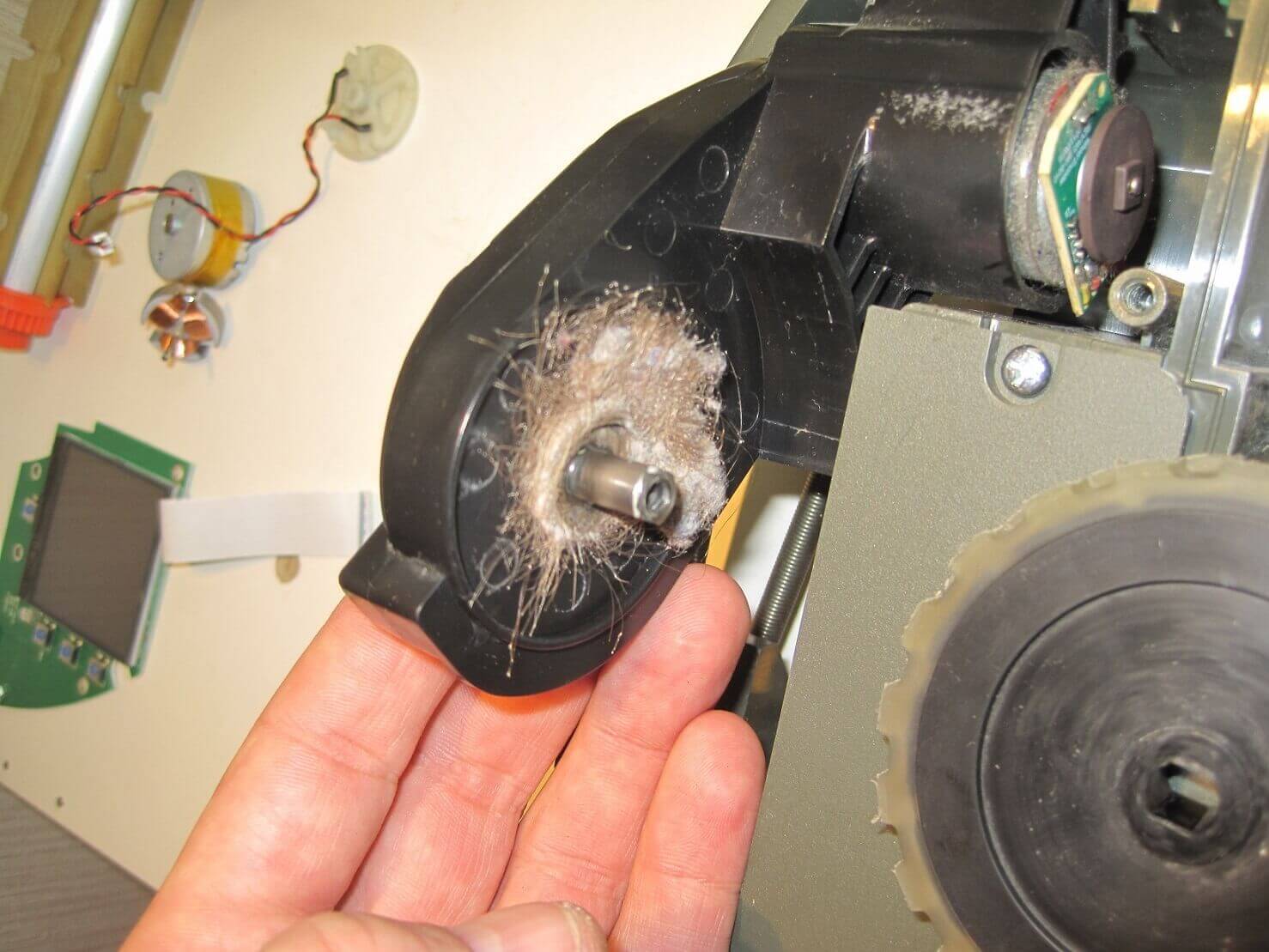
The reason why the brush does not rotate
If after cleaning, either the left or right brush still doesn't work, the problem is more serious. The side brush motor or gearbox may be broken. In this case, we recommend contacting a professional and not attempting to fix the problem yourself.
The video below clearly shows what to do if the brushes on your iRobot Roomba aren't turning:
Doesn't suck up dust
If your robot vacuum cleaner suddenly loses performance, moves around but doesn't pick up debris, and has poor suction, it's likely that its dust bin is too full. Remove the dust bin, empty it, rinse it with water if necessary, and dry it thoroughly. Repeat the same steps with the cleaning filters. It's important to note that not all filters can be washed with water; this is usually stated in the operating instructions.
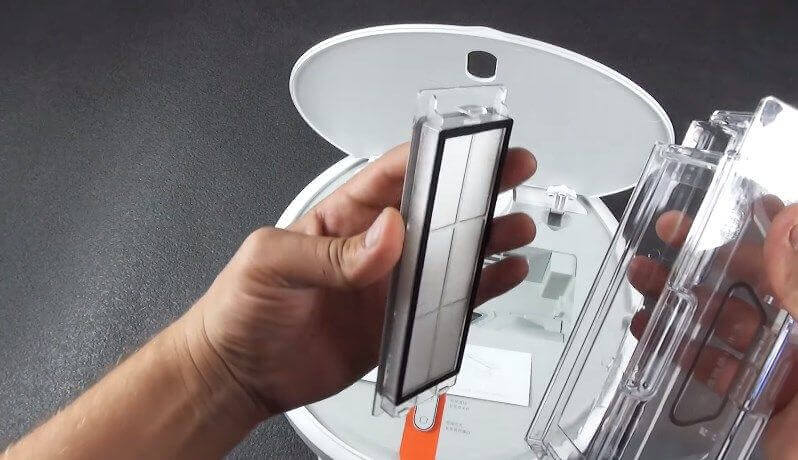
Installing a new filter
The second reason why the robot does not collect debris in the container and does not clean the room well may be contamination of the side brushes, as well as the central turbo brush (if your model of the device has one).
Another common cause of robot vacuum cleaner malfunction, which can cause it to not vacuum or pick up debris well, is that the brushes aren't dirty, but broken. This problem can be resolved by replacing them.
The most serious reason why a robot vacuum cleaner is moving around the floor without picking up debris is a faulty motor. The efficiency of the device itself depends on the proper operation of the motor. In this case, don't try to find information on how to repair the robot's motor yourself, as this is a rather complex and time-consuming process. Contact a professional for help, explain that the device is not pulling and that you've already ruled out other causes.
All of the above situations can also cause the robot to become noisy. Therefore, it's always important to remember that the robot is helping you, and you must treat it with care and provide basic maintenance.
In addition to the problem of the robot vacuum not pulling, a common issue with vacuum cleaners with a wet cleaning function and automatic wetting of the cloth is that the robot does not wet the cloth during wet cleaning. It's likely that the water supply holes in your device are clogged, or they were initially too small. Carefully clear them and the problem should be resolved.
Orientation problems
A robot vacuum cleaner navigates its environment using a navigation unit. In budget models, this typically consists of side obstacle sensors and anti-fall sensors. More expensive models use laser rangefinders and a built-in camera for navigation. These components are prone to malfunction, causing the robot vacuum to often fail to detect obstacles, twitch, stop in the middle of the room, run for half an hour and then return to its base, circle around the same spot, back away, and so on.
When the device constantly drives in circles in one place and is completely disoriented in space, this may indicate a malfunction of the side obstacle sensors.
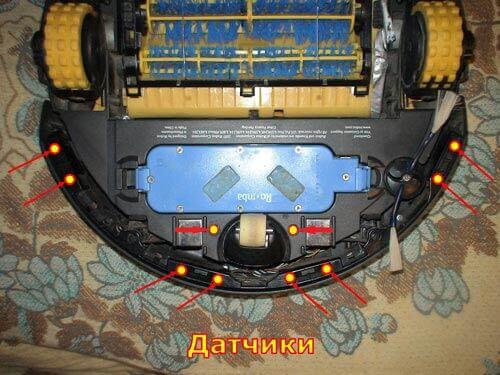
Location of sensors
If the device suddenly stops while operating and beeps, it could be due to a faulty battery, a malfunctioning navigation unit, or simply being entangled in wires or other foreign objects on the floor.
A malfunction where the robot vacuum cleaner simply moves backwards while cleaning, or moves backwards and then turns off, can be resolved by removing the front wheel and cleaning it of any dirt. The sensors may also be the problem; they may need to be cleaned of dust, or the LEDs may need to be replaced. If this doesn't help, and the vacuum cleaner still moves backwards, the problem likely lies with the device's circuit board.
Poor assembly could also be the cause. For example, a screw might have been loosened at the factory, causing it to become lodged in the mechanism and causing the motors to overheat. The video below clearly demonstrates how to repair an iLife robot vacuum cleaner if it backs up and turns off:
Subfloors are a weak point for most automated robotic cleaners. Almost every user complains that their robot vacuum cleaner doesn't work on subfloors or detects dark furniture, constantly bumping into it. Also, only a few robotic vacuum cleaners can navigate in the dark. This characteristic of smart vacuum cleaners isn't a flaw; rather, it's a common drawback of all robotic devices.
So, we've covered common robot vacuum cleaner malfunctions, their causes, and how to troubleshoot them yourself. If you're just considering purchasing a household robot to help you clean your apartment or house, we recommend choosing reputable brands with service centers and warranty support. In most cases, malfunctions are caused by faulty electrical components, which are unlikely to be repaired by an inexperienced person. We hope this has cleared up why your robot vacuum isn't working, won't charge, or can't find its base. You can also describe your problem in the comments; our editorial team will do their best to help!


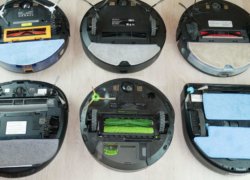
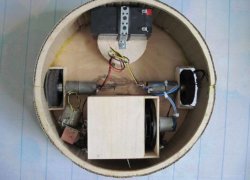
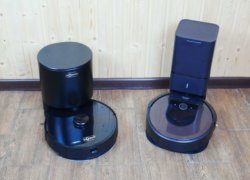
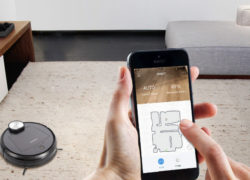
Hello. We purchased a Kitfort 520 a few months ago. A problem arose. The dust bin compartment wouldn't open. When I pressed the appropriate spot, I heard a clicking sound (as it always did), but the panel wouldn't open. Before vacuuming, everything was cleaned and there were no problems. Afterward, I tried to empty the dust bin and couldn't. Otherwise, the vacuum cleaner works as before.
The waste bin compartment does not open. When pressing the correct location, the panel does not open.
the waste bin compartment won't open
There is no Wi-Fi. It's not a *500 connection. And it's not clear if there's a charge, nothing can be seen.
Hello! We purchased a Samsung VR05R5050WK robot vacuum. It was running in zig-zag mode, but after three cleanings, it started leaning to the left and started collecting dirt in the container. The service department said they found no issues. Could you tell me what could be wrong?
I have the same problem, please tell me how you solved it
We bought a Rovus Tsunami vacuum cleaner, used it for a month, and then it stopped working. What's the cause? It turns on and then turns off as soon as you start vacuuming.
I put the new Neatsvor x520 robot vacuum on charge. After charging, it doesn't move at all. It says it's ready to clean and that's it. When I took it off the base, there was no sign of life at all.
So, did they help you?
Hello! My Deebot M88 vacuum cleaner is backing up. I checked the sensors. It turns out there's no power on the right side, meaning the right sensor isn't working. I moved it to the left side, and it works. This is true for all the IR sensors on the right side. What could be wrong?
You have two working channels and two not working ones. Use a multimeter to run the signal through the working sensors and compare it with the signal flow through the faulty ones directly on the board.
Hello. Could you please advise? I have an LG Hom-bot vacuum cleaner. The robot is 3.5 years old. It started turning on by itself after about five minutes of cleaning. It cleans fine on bare floors, but when I move it onto a rug, it immediately turns off. The battery charge is normal, and it doesn't make any noise before turning off. The self-diagnostics didn't reveal any issues.
Hello. The side brush won't turn off. It keeps spinning even when charging. Could you please tell me why?
Motor faulty
I bought a Tefal robot vacuum cleaner. Everything's great, but there's one problem: out of the blue, at midnight, it periodically tries to clean, waking everyone up. The timer doesn't work at all.
Good afternoon. I have the same problem. It turns on at 2 a.m. Maybe you've figured out what the problem is. The vacuum cleaner is also a Tefal.
Tefal sets the time in a 12-hour format. Check the set time and the programmed cleaning time: 2 AM - 2 AM, 2 PM - 2 PM.
I haven't been home for a week, and no one has touched the vacuum. I have a Philips vacuum, bought it six months ago. It works fine on gray laminate flooring, but as soon as it hits a dark gray, almost black, carpet, it starts backing up, even though the room was well-lit. Before that, it had been vacuuming and driving there without a problem. I wiped the sensors, cleaned the wheels, and shined a flashlight on the front sensors, thinking something was wrong with them. But it still backs up and moves toward the sunny side, and it works fine on the laminate flooring.
Why does ilive start and immediately go to the base?
This is probably no longer relevant, but it might help others. A couple of weeks ago, I encountered the same problem with my Deebot N79s: the robot would start cleaning at exactly 12:00 midnight. All the timers had been reset. I tried everything: turning it off (both the robot and the base), rebooting it, removing the batteries from the remote, unscrewing and removing the battery to reset it, and rebooting the router. I asked for help in the 4pda forum thread (on pages 88-89 for Ecovacs Deebot robots). Together, we managed to fix the problem: completely disconnect the robot from the network, delete the app from my phone, reinstall it, create a new account, ensure the network setting on the robot is set to 2.4G, and then connect the robot online. I hope this helps someone.
Good afternoon
We had the same problem; it turns out the vacuum cleaner needs to be turned off. The instructions say so. I unplug it from the base at night. No problems.
I have this problem with my Redmond RV-R670S. It only turns on at 4-5 am.
Mikhail, hello. Have you solved this problem? I have the same Redmond, and it only starts at 3 AM. It's really annoying, I've tried everything, but it still starts at 3 AM.
Hello. It says there's a problem with the fall sensor, but it hasn't been dropped. What should I do?
Due to increased load on the brush motor (hair tangles, etc.), the transistor on the control board burned out due to increased current. My transistor burned out due to abrasion of the brushes inside the brush motor. I repaired the brushes on one motor and ordered new motors. While the motors were running, the second motor died. One of the brushes inside the motor wore out and, having slipped past the commutator on the motor shaft, shorted out to the other brush. It turned out the control board had no protection against this, so the transistor burned out, and the motor voltage went to the processor. The processor couldn't withstand such abuse and also burned out. Now I have a stinking corpse.
Therefore, the first recommendation is that if you start having problems with the motors—they spin constantly, or, conversely, they spin and stop, and then start spinning again even on level ground—turn off the vacuum cleaner, remove the battery, and have it repaired by someone knowledgeable.
Hello! The side brush won't turn off either, even when charging. Please help.
Good afternoon. We had a Tefal vacuum cleaner for two months, and we weren't thrilled... then suddenly—the meter started moving and stopped. It gave an error message—a beep and flashes six times—meaning a ground check error. We wiped it down and cleaned it—no change. We took it to a service center. We turned it on there—it worked! We returned home, it worked for a week, and then—beep and flashes six times! Maybe someone can tell me what to do, what it wants. :)
Good afternoon! Did you solve the problem?
Ours worked for a week and then it gave this error:
We have the same problem, did you solve it?
Hello, Media 08, the main brush isn't working. It cleans for about three minutes and then says the main brush isn't working. I turned the vacuum on the ironing board and noticed the brush isn't spinning. I don't know what to do with it, it's perfectly clean. It's been working for a little over a month, so I doubt the motor is broken.
The hair was wound around the brush shaft and wedged.
Did you manage to solve your vacuum cleaner problem? Mine worked for a day and then gave the same error.
Good afternoon, Elena.
Most likely, the transistor on the control board in the motor power supply circuit is broken.
Hello! My Seebest C561 robot vacuum cleaner is charging and making a humming noise. What could be causing this?
During the first cleaning, the brushes stopped spinning after half an hour. What was the cause? What should I do? We turned it off and looked. Nothing was tangled. We turned it back on and it started spinning. But as soon as I started moving, the puppies froze again.
In a similar situation, a transparent rubber bouncy ball (a children's toy) got stuck between the brushes; it's not visible and the brushes don't spin.
Hello, does it work on black porcelain tiles?
Hello! One of the side brushes doesn't rotate at all, even though the bushing is movable, but the brush doesn't. My vacuum cleaner is new and made in China. What should I do?
Hello. We bought a Polaris PVCR 0926W vacuum cleaner a month ago. Everything seemed fine, but then my wife started it up and it started creaking and jerking, barely moving about 10 centimeters, then started twitching and stopped. The red button started flashing. Can you tell me what's wrong? Should I take it to a service center?
Hello! Check to make sure nothing's under the wheels. If you can't visually determine the cause, then yes, take it to a service center. Most likely, something is blocking the vehicle.
Good afternoon. I have an iboto v710. While it's charging, the red light comes on and beeps four times, repeating several times. I also noticed that cleaning time has dropped to 35-40 minutes. It used to take 1.5 hours.
I have the same problem, were you able to solve it?
Good afternoon, I have the same problem, have you resolved the issue?
If your vacuum cleaner is more than two years old, replace the battery. Its lifespan is two years maximum.
I had the same problem, then I pulled out the brush and there was a macadamia nut stuck in it in such a way that it was not visible from the outside)
I had this problem when a corner of a baseboard got caught in the brush. I took off all the removable parts one by one, cleaned them, and found the offending corner.
How to get to the 1126w pvcr batteries?
Hello, please tell me why, when the switch on the back of the LG robot vacuum cleaner is turned on, the robot says: "Starting charging," but after 5 seconds it says: "The switch on the back of the robot vacuum cleaner is off, please turn the switch on."
Hello! My LG Hombot robot vacuum cleaner tells me to turn on the switch on the back of the vacuum cleaner, but it's actually on.
We had the exact same problem. We contacted the service center, and they ended up replacing the battery with a new one.
Hello, I have the same problem. It also says something about the switch. Did anything help you?
I have a Neato xv21. The green light is constantly on. Trying to turn it off doesn't work. When I press the power button for 20 seconds, the light goes out and then comes back on after 5 seconds. I disconnected the battery, turned it back on, and the same thing happens. When I connect it to the charger, nothing happens. Where should I look? What could be wrong? Can anyone tell me?
Hello, I have the same problem. Did you manage to solve it?
Good afternoon, it's the opposite with us. Nothing lights up, doesn't respond, no voice. But when you press the button, it starts vacuuming, but silently and without light. I don't understand what to do.
Good afternoon.
What should I do if one of the brushes is constantly working, spinning at the same speed while charging in cleaning mode? Is this really a motor malfunction?
Sincerely!!!
Hello! Was your issue resolved? Were you facing the same problem?
Good afternoon.
Please tell me what the problem is and how to fix it?
Robot vacuum cleaner, Bist Home Clean 7, the "home" light, also known as the charging indicator, does not light up.
Can anyone help? The fan motor on my Life i50 vacuum cleaner has failed. I ordered a new one from China. I replaced the motor, turned on the vacuum, and it moved 10 cm, causing the fan to shut off. Two fuses on the board blew. I checked the motor, but it wasn't working.
After replacing the fuses and installing the old motor, the vacuum cleaner works, but there is one drawback: the motor does not turn off at all.
QUESTION: What else could have burned out on the board if the vacuum cleaner is working properly and the problem is only with the fan?
The transistor may have died.
Problem: the charge indicator or home indicator does not light (how did you solve the problem?
The Amagar robot vacuum cleaner constantly displays the E16 error (clean brushes), despite the fact that the brushes are clean.
Hello, could you please tell me the lid latch on my Polaris robot vacuum cleaner is broken. Specifically, the tab inside the latch is broken. Where can I buy or order a replacement latch?
Good afternoon,
Please help me. My Roborock Sweep One vacuum cleaner suddenly stopped supplying water and cleaning wet. I've changed the filters and washed everything, but the cloth won't get wet, even though there's water in the tank.
What should I do and how can this be possible? Thank you very much.
Hello, Olga! Have you solved this problem? I have the same problem, please share your experience.
Same thing, you didn't find the reason?
We had the same thing. We tried clearing out the downloads, but it didn't help.
It only started working after I changed the plugs (Water Tank Filter Parts for Xiaomi Roborock), they are sold in packs of 12.
It's not charging, the red button is on. What could it be?
If your vacuum cleaner is more than two years old, replace the battery. Its lifespan is two years maximum.
If your vacuum cleaner is more than two years old, replace the battery. Its lifespan is two years maximum.
Hello, Irobot vacuum cleaner. It's been working fine for two years, but recently it's been crashing into walls without slowing down. Now the problem is that it's started reacting to thresholds and carpets, refusing to step on them, or conversely, if it stops on a carpet, it turns around and drives across them. This hasn't happened before. Is there anything I can do? Thank you.
Hello. The PVCR 0726W vacuum cleaner is turned on by a switch. When I press the button, the protection is activated with a double beep, the red light comes on, and that's it. After a short while, the beeping starts again, and the red light stays on. I need some help. Best regards.
Good afternoon! We have the same problem. Could you please tell me if you have solved it?
Hello. We haven't used the vacuum cleaner for a while. We replaced the battery. The robot vacuum runs for a minute and then turns off. There's no error message on the remote control. It doesn't heat up. We tried turning it on several times, but the problem persists. It's a Clever&Clean robot vacuum cleaner. The service center is only located in Russia; we're in Kazakhstan. What could be the cause?
Good afternoon. Why does my vacuum cleaner squeak when I move it?
Hello. We purchased a Xiaomi Mi Roborock Sweep One a few months ago. We encountered a problem: the dust bin won't open. When I press the right spot, I hear a click (as always happens), but the panel won't open. Before cleaning, I cleaned everything and there were no issues. Afterward, I tried to empty the dust bin and couldn't. Otherwise, the vacuum cleaner works as before.
Svetlana, hello. I have the same vacuum cleaner. The dust container won't come out anymore. Have you managed to solve the problem? Please share!
Hello! Could you tell me how you solved this problem? We had the same problem.
Hello. I have an iLife V7s Plus vacuum cleaner. I charged it for a day before using it for the first time. It vacuumed for two hours until the battery died, then crawled back to the charging station and started charging. This was in the evening. The light was flashing orange as expected. In the morning, it was off—sleep mode. I emptied the dust, emptied the dust container, cleaned the brushes, and wiped the sensors. Two days later, I decided to vacuum. I pressed the clean button, and the vacuum turned green. It stayed green, then beeped, started flashing orange as if it were charging, and then went out completely after 5 minutes. Turning it on again did the same thing. It charged for 5 minutes, then went out. It went into sleep mode. If I remove it from the charging station, it doesn't turn on at all.
Did you manage to solve the problem? I have the same problem.
Did you manage to solve the problem? New vacuum cleaner, same problem! ILIFE V8C
Hello. I have an iLife V7s Plus vacuum cleaner. After one month of use, it started to see a virtual wall in front of it. Thank you for your disassembly instructions. When I opened the vacuum, I didn't notice any large amounts of dirt. But after all the cleaning and manipulation, the virtual wall disappeared. There wasn't a speck of dust inside the drive belt. I blame a general software glitch, and in fact, a power reset and cleaning did the trick.
Hello. Could you please tell me why, after turning on my PVCR 076W robot vacuum, the green lights come on as expected, but after pressing the power button, the red lights come on and a beeping sound is emitted? All sensors have been cleaned and checked. What else could it be?
Hello! I've been using the Gutren Joy vacuum cleaner for six months. I opened it to empty the dust bin, and it beeped and turned yellow, like when the battery was low. It went to the charging station, but before it reached it, the red light came on. It sat charging overnight, and the red light stayed on. I turned the button off and on again, and it beeped and then stayed red. I waited a day for the battery to fully discharge. Now, when I put it on charge, the green light comes on for a second, then the yellow light comes on for a second, and then the red light comes on again with three beeps.
What can I do or how can I reboot it? Our city's service centers are weak. Thanks in advance.
Hello! My KIT FORT KT-501-3 vacuum cleaner isn't detecting the base... Everything works fine, but when I finish cleaning or press the corresponding button on the remote, it starts moving erratically... What could be wrong?
It doesn't work, it says, "A problem was detected in the wheel area." I unscrewed the bolts underneath—the wheels come out a little. Nothing is stuck or twisted. What should I do?
I solved the problem by disassembling the vacuum cleaner and cleaning the sensors on the motor control board. Both wheels have a motor with a small board containing a sensor (a glass piece) that reads the wheel speed. After cleaning, the robot is back in good working order! I'm sure my advice will help many! Good luck to everyone!
Please tell me, since you took the vacuum apart, maybe you could tell me what the problem is with the wheel? The vacuum leans to the left, and when it's parked, it's clearly crooked. When inspecting the wheels, one wheel moves easily, but the other is stiff and doesn't seem to be fully engaged. What could this be caused by, and should I take it to a service center?
The vacuum cleaner turns on normally, but it only works in a small area and constantly spins to the left. It retracts into the base without issue... Upon inspection, I discovered that one of the wheels is spinning with greater effort than the other. What should I do?
There's a spring in the wheel well that secures the wheel bracket to the stop. Apparently, the springs are different lengths or the stops are different sizes. Something's in the way.
My Polaris robot vacuum cleaner beeps three times and spins around in place, as if it's stuck. All the sensors are clean, including the one under the front wheel. It's moving in a spiral. It moves forward from a distance, but only in short bursts (as if it's bumping into something). What else should I clean? Or should I take it to a service center?
Hello. I just purchased a Tsunami robot vacuum cleaner. It keeps returning to the same spot several times, but some spots remain uncleaned. What's wrong?
Good afternoon,
Please help me. My Xiaomi Roborock S50 vacuum cleaner suddenly stopped supplying water and cleaning wet. I've changed the filters and washed everything, but the cloth won't get wet, even though there's water in the tank.
What to do? Thank you very much.
I had a similar issue. We replaced the supplied consumables. It didn't help.
An air inlet is located equally spaced between the wicks on the same side of the water tank. It's very small and gets clogged with calcium salts. It needs to be cleaned; a thin needle is sufficient. Some people use pieces of synthetic tissue, cotton pads, or other suitable material instead of wicks, and then discard them after a while.
I Googled today and couldn't find anything that would make sense to a blonde. Finally, I dug around and found something that needed cleaning.
But my iLife 5s pro robot vacuum cleaner wasn't supplying water. The micro-holes in the tank were clogged with calcium.
It only moves forward, but jerks.
After several convulsions he dies.
ILIFE vacuum cleaner. About 5 seconds after starting cleaning, it suddenly stops and the red charging indicator lights up. After another command, the same thing happens again. After the "home" command, it returns to the base normally. It charges normally. We had previously replaced the wheels, but after the repair, it worked fine for a few days. We've been using it for a little over a year.
You should follow the manufacturer's maintenance recommendations, clean the brushes and main brush bearing, and the robot will likely work again. But you've already reached the end of its service life, and sometimes it's easier to replace the robot with a new one than to repair it only to have another malfunction a month later.
I had the same problem. It worked for a few seconds, then stopped, spun the brushes quickly, and then went silent, beeping twice. It turned out that hair had gotten caught in the brush shafts. After cleaning, everything returned to normal. I'd be happy if I could help anyone. Ilife 5 v.
Hello! I have a Polaris 0726, it's been working for over a year, and I'm very happy with it. But the last two times I've cleaned, the vacuum cleaner started vibrating loudly while running. It doesn't always vibrate, but it works fine for a while, then starts roaring again! I can't find any information about this problem online. Could you tell me what it could be? We can disassemble and repair it ourselves, but we need to know where to look.
I had a similar problem, try removing the front guide wheel and lubricating the pin that it goes into the vacuum cleaner with, it helped me.
Please tell me where I can buy the motor that turns the brushes?
You can look for a ready-made brush module in local online stores, but you'll most likely find one on AliExpress. One caveat: you won't find one exactly like it—the markings you see on the motor aren't usually sold at retail, only in large quantities ordered by robot manufacturers and assemblers. You'll have to find something similar, which is usually time-consuming and expensive. Therefore, buying a complete module is faster and ultimately cheaper than selecting one.
When I turn on the robot, it asks me to put it on the floor and then freezes. What does this mean?
Hello! A couple of months ago, we bought a second-generation Xiaomi Roborock robot vacuum cleaner, and it started displaying error #4. To fix it, simply wipe the sensors and move the vacuum to a flat surface. I've tried everything from removing the bumper to thoroughly wipe all the sensors and resetting it to factory settings, but it still displays the same error and refuses to clean. Please tell me how to fix this.
The problem is indeed with the sensors, but to fix it, you need to disassemble the robot, determine which sensor group is faulty, and replace them. Sensors are sold on AliExpress.
Irina, did you manage to solve the problem? I have the same problem.
The Panda i5 robot vacuum cleaner only moves in circles. How can I fix it?
This is a fairly common problem: a robot's wheel module has failed. Usually, replacing or repairing it is sufficient—the problem is in the motor. However, this often leads to failure of the board that controls the motor.
Hello. Something started rattling inside my GUTREND FUN 120 vacuum cleaner. We took it apart and discovered a heavy metal plate. There were almost no traces of glue or grooves on it, and it had fallen out of nowhere. What is it for? Will its absence affect its operation?
If it's heavy even without anything, it's just a weight. Check that it's attached somewhere near the wheels.
We resolved the issue from July 14, 2019 ourselves. We found a place for the hardware. Thank you.
What to do if the vacuum cleaner spins in place and displays an error message: the radar is blocked.
It's worth clarifying the robot's model, but at a minimum, the robot's bumper with sensors is blocked, or something is stuck there, and the robot thinks it's too close to an obstacle and tries to turn around, or there's a problem with the bumper sensors, often causing water ingress.
Tell me how to fix the problem: the rangefinder is blocked (says the robot), and the vacuum cleaner is spinning in place.
Good afternoon. My Xiaomi Mi Roborock Sweep One has started acting strange. Basically, you place it on the base, it says it's charging, but after a while you find it's a few centimeters away from the base. Consequently, when you access the app, its status is offline. If you press the cleaning button after placing it on the base and it beeps that it's charging, it seems to start cleaning, starts its motor, and begins moving, but then immediately stops and goes silent. Once, I managed to use the app to press the button to go to a specific location on the map, but it confused its location on the map and couldn't find it. That's how it works.
Evgeny, you have several problems, one of which is clearly either a battery issue. You should remove the battery and check the voltage on the black and red wires.
I have the same problem. I've tried everything. I even replaced the battery itself. It's possible the contacts in the vacuum cleaner itself have come loose from the circuit board. I haven't been able to solve the problem yet. Overall, it's a strange situation.
Hello! I have a Polaris robot vacuum cleaner. We purchased it six months ago. In normal cleaning mode, it moves about 50 cm or a meter, then turns around and goes the other way, and so on. It moves erratically in practically the same spot. We wiped the sensors with a cloth and cleaned the central wheel. It still behaves the same way.
There are many Polaris models, so it's worth checking for specifics. It's worth checking the ease of rotation of the main brush, if your model has one.
We have the same problem. We have a Gutrend Aqua Style vacuum cleaner. It's three years old. We've cleaned the sensors periodically. But since yesterday, it's been going 50 cm, then turning around and going the other way. It's moving like a herringbone pattern for about a frame. We can't figure out what's going on. Does anyone have a solution?
Hello. My ILIFE stops in wet cleaning mode, the wheels spin, but it doesn't move. Or it stops and jerks from side to side within a 30 cm radius. In normal mode, everything is fine.
You probably shouldn't wet the cloth too much, as the robot will simply stick to the surface.
Hello. The ILIFE works well in wet cleaning mode for the first 2 minutes, then it stops and turns around, moves 30 cm, turns around, and so on, 30 cm at a time. When stopped, it almost bounces when it locks back into place. In normal mode, everything is fine. Thank you.
Hello, I accidentally connected the wrong charger to my Panda i5. Now the vacuum cleaner takes a long time to charge, vacuums for about 30 minutes, and then starts searching for the base. What can I do?
Yulia, it's likely the robot's battery is failing—its capacity has dropped. Connecting a different charger was simply a coincidence. The robot has enough protection to prevent the battery from failing when connecting a different charger.
Thanks a lot!
Please help me understand/solve this problem. My iLife V7s Plus robot vacuum cleaner doesn't drip water from the tank nipples onto the cleaning cloth during wet cleaning. The tank is tightly sealed with a rubber stopper, creating a vacuum inside—that's why the water doesn't drip. I have to constantly stop it, open the lid and stopper, let it drip, and then restart it. Of course, I thoroughly wet the cleaning cloth before starting it. But it dries out, and the robot continues to run with a dry cloth and a full tank. My friends have the same model and never have this problem. The cloth is wet from the tank with the lid closed. Is this a defect, or does something just need to be adjusted? As a last resort, I plan to remove the stopper entirely; the robot runs on a flat surface without spilling anything. But I don't understand why this is happening to me?
Anastasia, your robot uses an air pump to dispense water in batches. There's a port on the left side of the water container for air to enter. There's also a hole opposite this port. You should check for debris. If so, your robot's pump isn't working. Could you please clarify whether the brush rotates when you insert the water container? Perhaps the robot simply doesn't know you've added water?
The plug can of course be removed, but the water will leak out too much.
Hello! I'm having a problem with my iLife V55—the vacuum cleaner lid won't open. I have to pry it open with a knife. And when I close it, I have to apply force, otherwise it won't close. What should I do? Is there a way I can fix this myself or should I call a professional?
It seems like it's worth vacuuming the lid lock, but if that doesn't help, it's best to replace it—it's sold on AliExpress.
Hello! I'm having a problem with my iLife V55—it displays an E04 error when I turn it on. Could you please help me figure out what's causing this and how to fix it?
Leila, you should wipe the three rock sensors located along the edge of the robot near the bumper, check how easily the robot's wheels are pressed, and listen to see if you can hear the switch click when you press the wheel all the way down. It's quite possible something has gotten into the wheel well and the robot can't fully stand on its wheels. It's a good idea to place the robot on a table and check that it's level.
My Xiaomi vacuum cleaner started whistling, but the wheels and dust bin are clean. We bought it new two days ago. One wheel, or rather the black wheel rim, is worn against white plastic, showing signs of friction. The other is fine. Could this be the cause, or should I look for other ones?
Anastasia, this is a common problem with the robot. The front wheel squeaks due to the plastic. You can remove it and run the robot, and the squeak will go away. You can clean it and simply rub the axle with your fingers; that's enough to make the squeak go away, but you don't have to do anything; the noise will go away on its own in a few days.
THANK YOU! You are simply super!!!
It started whistling 3-4 days after purchasing it (Xiaomi vacuum cleaner, Xiaomi, white - robot), I read your message, just sprayed some windshield cleaner on the wheel (the first one I could get my hands on), the squeak went away!
Hello, my Liectroux c30b robot doesn't see the dust bin. It keeps telling me to insert the bin, even though it does see the water bin. Could you please tell me what this could be? We just turned the vacuum on for the first time...
Svetlana, it's likely that a magnet popped out of the container or the sensor that detects it has malfunctioned. You should contact the seller for an exchange.
My Samsung SR10M7010UW robot vacuum cleaner vacuums for about 10 minutes, then just moves around the apartment without vacuuming. What's the cause?
Victoria, your robot's fan is likely failing. A service center will likely be able to resolve your issue. Your robot has a standard fan on a brushed motor; many models will fit.
My iLife v55 pro vacuum cleaner's display stopped working and doesn't respond to the remote after two weeks of use. What should I do?
There's a high risk of liquid spillage. You should disassemble the robot and inspect it, or take it to the seller for an exchange or a repair shop.
The Roborock s7+ station has stopped emptying the dust bin. There's a distinctive sound. We tried placing the station itself on top of the vacuum, and it sucked up debris, but it can't empty the dust bin. We bought this vacuum a couple of months ago. Could there be a problem with the vacuum itself? There's nothing clogged. We recently updated the firmware. We can't remember if the vacuum stopped working before or after the update.
Hello, could you tell me, my i5 panda was cleaning and suddenly stopped and turned off. I put it on the base and it goes into a cyclical on-off cycle. The battery is fine, I checked it and it's charging.
Thank you
Hello, Alexey, I've already answered a similar question—most likely, the motor control driver on the robot's board burned out, and it needs repair. But the i5 is a sophisticated robot in terms of electronics, so it's hard to say anything without diagnostics.
Hello, my Roborock is complaining about a magnetic field. There are no magnetic strips, only wool carpets. Could this be the cause? How can I fix this error?
Hello, we bought a Rowenta Series 60 robot. It hasn't cleaned a single time. It makes a little noise, moves around, and then displays an error message (the robot is stuck).
We placed it on different surfaces, but it still doesn’t move and gives an error that it’s stuck.
What to do?
The Tefal robot often returns to the base during cleaning.
Place the robot on a table and start it up. This will help you determine if there are any heavy iron beams underneath your flooring that were installed during construction. You can also remove the front wheel and try starting it. There have been cases where small magnets have stuck to the front wheel, magnetizing its axle, and the robot has been unable to operate. Further assistance is only possible after you answer these questions or perform some simple manipulations.
I have the same problem. I just got a new Xiaomi vacuum cleaner, it's the first version. I live in a private house with metal beams on the floors. It detects magnetic fields in some places around the house and goes into error 11. I don't know what to do. Help!
Absolutely right! Neodymium magnets from children's construction sets are a small but insidious enemy of the robot vacuum cleaner! If one gets inside the front wheel, it's almost invisible, but the wheel keeps spinning. This completely disorientates the robot, it backs up, climbs walls, has difficulty finding the base, and if it does find it, it can't connect to it.
I have a NEATO XV-21 robot. I replaced the batteries in the vacuum cleaner with new ones. When the vacuum cleaner is on the charging station, the backlight around the START button is constantly on (sometimes blinking green, sometimes solid green). It never goes out, even in "sleep" mode, when the screen goes dark. This didn't happen with the old batteries; both the screen and the backlight would go out. The robot was unplugged for a week and a half while on vacation. Of course, it ran out of battery. Now, when charging at the charging station, both the screen and the START button backlight go out after about a minute or two. I can't find an answer anywhere as to what the instructions say. Does "sleep mode" mean the screen and START backlight are off? Or should the START button always be lit?
You can choose the mode in the robot's menu yourself - screen backlight and button backlight in sleep mode, in the menu item you can turn the robot's lights on or off, I don't remember the exact phrase, but there is an OFF or ON option.
Please help me solve this problem. My Xiaomi Roborock doesn't drip water from the water tank nipples onto the cloth during wet cleaning.
Asia, you should check to see if the air inlet hole, which is located exactly in the middle between the nipples, is clogged. It's very small and often gets clogged. The nipples/wicks could also be clogged and fail. Before wiping the floor, you should wet the cloth beforehand.
Thank you
Hello. My Xiaomi Roborock S5 has started acting strange. I bought it in Russian, brought it home, installed the app on my phone, and tried using it both with and without the phone. After a while, it asked me to update the app. I did, but now it doesn't draw a map on the phone, and the phone doesn't detect it. It only sends a message to the phone in the app about the work done. I pressed two buttons to update the Wi-Fi, but it doesn't help. I also deleted the app on my phone, but it doesn't help. Please help me figure this out.
Asia, you shouldn't have updated the robot. You should clarify what language the inscription on the robot's nameplate is in.
The inscription on the nameplate is in Chinese
Now it’s clear that it wasn’t worth updating the robot, but is there really nothing that can be done?
Now it's time to roll back/restore the settings to factory defaults: find the Reset button under the robot's lid, find a thin object that you can press on it with.
Press and hold the two outer buttons on the robot's keypad, press reset, and hold until all the backlighting, including the white and blue lights near the reset button, go out. Release the reset button, wait for a voice message and the keypad to flash white, and then release all buttons. After 5-10 minutes, the robot will inform you that the software has been restored—most likely in Chinese. Try connecting to your smartphone by resetting the robot's Wi-Fi. There are other options, but they require installing additional software on your phone and updating the robot's firmware to a different region.
My Xiaomi Roborock S5 vacuum cleaned the entire apartment perfectly after the first run, including a small rug in the hallway. I returned it to the docking station. When I restart it, it keeps displaying Error 4 and the red light on the Start button. I've wiped all the sensors multiple times. I've tried resetting all the settings to factory defaults, but nothing helps. Could you please tell me what the problem could be?
The rock sensors on the bottom of the robot are probably not working, and the robot thinks there's no floor underneath it. This happens, so you should contact the seller for an exchange, return, or warranty repair, or take the robot in for service.
The Philips SmartPro Easy FC8792/01 robot vacuum cleaner worked perfectly for a year and a half. I periodically cleaned the wheels of hair that had gotten caught in them. Now we've noticed it's running back and forth, making 180-degree turns to the left for a short distance of about 20 cm. When I turn on the wall and circle programs, it initially follows them, then switches back to the "back and forth" mode. What could be wrong?
You should check whether the robot's front wheel rotates easily; the robot probably thinks it's stuck—there's no signal from the front wheel sensor that it's rotating.
Hello. I have an iRobot Roomba 555. The power indicator stopped turning on. The vacuum cleaner doesn't turn on. The base is producing volts. I cleaned the vacuum cleaner. I checked the battery with a screwdriver indicator, and it showed that it's charged. What's the problem?
Tatyana, these problems usually occur with the robot after liquid spills. The robot won't turn on. It's worth disassembling the robot to inspect it for oxidation or taking it in for service.
Hello. The Liectroux C30B robot vacuum cleaner doesn't do wet cleaning and either stands still or creaks.
Slava, it seems like you should check the water container; you're probably getting the wipe too wet. Try running the robot with a dry wipe.
Hello! My Xiaomi Roborock S5 started cleaning only half the apartment. Then it returns to the docking station and I get a message that the cleaning is complete. What should I do?
It's worth vacuuming the side wall sensor, which is located in the bumper window above the side brush, and wiping it without fanaticism.
Thanks! I'll try cleaning it.
Today, (I haven't had time to clean the side sensor yet), I cleaned the apartment (I wrote 30 square meters in the report, not the full 40), and returned to the station. The charge was still at 77%. A couple of minutes later, I went back to clean. They sent him back to the base themselves. Maybe he's just going nuts?
I have the same problem: the robot left and cleaned a small area, said it was done, and then went to charge. If I start it again, it will do another partial cleaning, say it's done, and then go to charge. The robot is a REDMOND rv-r670s.
Hello. The vacuum cleaner isn't moving forward; it feels like the bumper sensor is triggered. It's a Proscenic 800t.
Anton, it would be worth describing the problem in more detail, but it is often associated with difficulty rotating the main brush.
Hello, I have a Midea robot vacuum cleaner. It's two weeks old. Today, after charging it, I started it up, and it started moving in jerks. After two minutes, it stopped and beeped! I started it up again, and it started doing the same thing! It seemed to rock forward, then stop, then stop, then beep. What's this? Thanks for the reply!
Good afternoon! Please help me solve this problem.
I have a clever & clean aqua-series 03 vacuum cleaner. It's been in use for a little less than six months, using it two or three times a week. It's worked perfectly the whole time.
Today, it suddenly stopped in one place and wouldn't move, as if frozen. I took it to the base, but it couldn't get onto it on its own. It kept missing the mark. I placed it back on the base manually. After fully charging, when I gave the command to start cleaning, it moved a couple of centimeters from the base and then completely shut off, not responding to either the remote or manual controls. When I rebooted the vacuum using the button on the side, the same thing happened. It checked its systems, announced the start of cleaning, attempted to move, and then immediately shut off. There was no mechanical damage, the container was clean, and there was no dirt or hair on the wheels.
What can be done in this situation? Any suggestions as to the cause of the malfunction? I live in a country where there are no service centers.
These are very inexpensive robots, so repairs are not very cost-effective, especially since the problem is in the board of your robot. In your case, it is worth buying a new robot, at least an iLife, but it will last for about 2-3 years for sure.
You can try to roll your robot, if possible, about 50-70 cm, like a children's car, forward and backward 3-4 times, sometimes this helps.
Help! Our Xiaomi robot has been working great for a month, but for the past two days it's been unlatching from its base and won't put it away. If I force it to latch, it plays music, says it's charging, and then after 30 seconds it unlatches again. Yesterday it showed error 15. We cleaned all the sensors, the brushes, and the container are clean. But it still refuses to do anything. What do you recommend?
Elena, you should take it back to the store and claim your warranty. If that's not possible, there are plenty of Xiaomi repair shops these days. Just search for it in any browser and select it. But it looks like your battery is dead, and the robot is moving away to stop the abnormal charging process.
Error 15 is a dirty wall sensor, which is located in the bumper window above the side brush. It should first be vacuumed and then wiped without fanaticism.
Hello! We encountered the same problem. The error code wasn't showing and it asked us to clean the contacts. We cleaned everything, took the base apart, and cleaned the inside, but it didn't help. We installed a new battery, but there was no change. Tech support isn't responding, and there are no service centers in range. What else can I check? Thank you.
Good afternoon. When I start the iseelife robot, it spins quickly, first in one direction, then in the other. It moves forward after a meter, then stops, turns red, and beeps. After a few seconds, it starts moving off the charger, and the red light continues to flash. Could you tell me what might be causing this? Thank you.
Marina, it seems one of the bumper sensors is jammed in the robot, and it's trying to get rid of or turn away from the obstacle. It's worth checking if the robot's bumper moves easily.
The Gutrend fun 110 pet isn't charging when connected directly to the power adapter on the side of the robot. What could be the cause? All electronic modules are working properly, as are the power adapter port and the power button on the vacuum cleaner. Thank you.
Andrey, if all the modules are working properly, why isn't it charging?
The problem seems to be with the power supply. It's worth checking: are you using the specific adapter intended for this particular robot vacuum cleaner? The robot usually has a label indicating the adapter's voltage; it should match the voltage indicated on the power supply itself.
Hello, my iLife vacuum cleaner (40 or 50) got tangled in the wires. We took it to the base, crawled it up, and the green indicator light was on. When I started it, it beeped twice and flashed blue lights, but didn't move. Then it went out.
Hello, my LIECTROUX C30B vacuum cleaner won't move forward, meaning both wheels won't spin. One of the wheels will occasionally jerk, but that's it. Could you please tell me what this could be and how to fix it? Thanks in advance.
Ruslan, judging by your problems, liquid has spilled onto the board of your robot. You should disassemble the robot and inspect the board for oxidation.
Hello. If the problem is with the board, is it possible to replace it or repair it?
Ruslan, were you able to solve the problem? I'm having the same issues with this model.
I had a similar issue with my LIECTROUX C30B vacuum cleaner: one wheel was trying to twitch, the other was spinning, but the speed was suspiciously high. This caused the vacuum to spin in circles.
The solution was to replace the wheel module (the wheel, the drive itself, and the connection cable), specifically replacing the part that was spinning quickly, not the part that was twitching. After that, both wheels worked properly.
By the way, the Kitfort KT-533 robot vacuum cleaner is a close analogue of this model.
Good afternoon, my SilverStar XR510F is running on its rear wheels, not critically, but about 5 mm of rearward tilt. I don't know when this happened. I took it apart for maintenance. Perhaps I reassembled it incorrectly, or the spring mechanism has weakened? Please share your thoughts.
Anatoly, you should check the front wheel, most likely it is not seated in place.
This is the first thing I checked, it sits in place.
Hello. I have a Xiaomi Roborock vacuum cleaner. The dust bin won't come out. Could you please tell me what the problem might be? Otherwise, the device works flawlessly.
Evgeniya, you should remove the brush guard, the brush, and push the dust bin from below while pressing the latch on top. You might have caught a stone or sand and the dust bin is simply jammed. Firm, brute force applied from below usually helps remove the dust bin.
We bought the EXVAC660 robot vacuum cleaner in November. Everything was great until it sucked a soft toy made of thread through it. It started cleaning and then stopped. What could be the reason?
Yulia, you should remove the main brush guard and the brush itself, try running the robot without the brush, and check how easily the brush rotates.
The Ilife A4 robot stops working after it's docked (it beeps, but nothing happens). If I manually remove it from the dock, it works as expected and docks without issue (the problem is definitely not with the dock, as we tried it with a similar dock for another A4 robot—the same thing).
Konstantin, I read that if you wipe the robot's wheels and the area in front of the base, the robot simply slides around on the base and can't move off. The timeout ends, and it's back on the base charging. Try it.
In my opinion, the problem is in the board, the robot thinks that it is connected to the charger with a cord, the board needs to be repaired.
My ILIFE V80 vacuum cleaner runs in wet cleaning mode for 2 minutes, then stops and switches to "Home" mode. What could be the cause? Please advise.
Should we elaborate on the problem? Does the robot work longer in other modes or without wet cleaning?
The iLife v80 vacuum cleaner runs for a couple of minutes on wet cleaning and then stops, with the "house" indicator on. It works perfectly on dry cleaning. The vacuum cleaner is almost new.
I have the same problem. Did you solve it?
The Ilife v7 robot is stuck and won't work after moving. The "stuck" signal comes on and then stops. After pressing the home button, it goes home to charge. After charging, it doesn't work and beeps three times, saying it's stuck.
It's worth cleaning the main brush, or at least removing it and running it without it.
The Philips SmartPro Fc8776 robot vacuum cleaner travels a meter and then stands still. The brushes sometimes spin, sometimes not. The motor works, but it doesn't move any further and stands still.
It's difficult to answer this question without instrumental diagnostics; you'll have to take the robot to a service center.
Hello! I have a Panda X4 Pet Series vacuum cleaner. It's throwing an E12 error, which isn't even listed in the instructions. The vacuum quickly runs in circles, mostly in reverse, and then throws an E12 error. Can you tell me what this could be?
The problem is in one of the wheels, but it is unlikely to be solved using home methods; you need to disassemble the robot and look for the problem in the board or drive.
The Roborock S55 vacuum cleaner works perfectly except for one thing: the on/off button doesn't work. I managed to start it from the base and from my smartphone, and all the updates have been installed. You can vacuum using the partial cleaning button or from your smartphone via the MiHome app. The only way to turn it off is automatically after 12 hours of inactivity (i.e., it turns off automatically). What should I change?
Alexey, I've answered you on other resources, but I'm looking for a more convenient answer. The robot needs repair, and only instrumental diagnostics can reveal what's wrong.
Hello, I have a Liectroux C30B vacuum cleaner. When I first connected to the app, I received a prompt to update. The update started, but then something went wrong, and the vacuum lost WiFi. When I tried to connect to my phone, I heard a voice message about trying to connect to the network, but the indicator light on the vacuum didn't light up. Is there a way to reset it to factory settings or fix this? Thank you.
Julia, you should remove the battery from the robot, then put it back in and try again.
Did you fix the problem? I'm experiencing a similar issue. An error occurred during the update, and now it won't turn on or make any sounds. Only the power light is on…
Good afternoon
I recently purchased a GUTREND ECHO 520 robot vacuum cleaner.
Everything was fine. It charged fully. It cleaned up part of the room pretty well the first time around.
The next day, after charging to full capacity, we started another cleaning.
He started cleaning quickly, turned around, looked around, but after some time he stopped and voiced the problem of the clogged front wheel and asked to clean it.
After inspecting the front wheel, nothing out of the ordinary was discovered. There was no visible clogging or tangled hair. After removing the wheel, the sensors were also inspected. They were also clean. Just in case, we wiped them with the included cloth. After reinstalling the wheel, no visible or audible malfunctions were found.
With positive emotions, the vacuum cleaner was launched again using the smartphone app for cleaning, but again, without even leaving the base, the following defect was detected (voiced): a wheel malfunction, please clean it.
I searched the entire Internet, but nothing was said about this particular malfunction, not even in the operating manual.
Please help me and let me know how to fix this problem.
Thank you!
And it's unknown, Yuri, the robot needs to be disassembled and inspected. You should contact the seller or service center.
I wrote a message about my robot vacuum cleaner. When I place it on the charging base, it constantly beeps. What does this mean and how can I fix it? I need help for us, pensioners. Our children gave us the vacuum cleaner as a gift. When will we receive a response?
Valentina, could you please tell me the robot's model and whether you installed a dustbin? You should read the robot's manual; it will likely mention this issue.
Hello! I purchased an iBoto Smart V720GW Aqua vacuum cleaner. When one of the rotating brushes gets caught in a crevice or something large gets wrapped around it, both brushes stop spinning completely. Restarting the vacuum doesn't help. When I disconnected the battery, removed the brush motors to check their functionality, powered them up from the battery, reinstalled everything, and reassembled it, the vacuum started working and the brushes started spinning. The next day, the same thing happened, so I had to disassemble it again and repeat the procedure, and the next day, the same thing happened again. How can I solve this problem?
The brush motors need to be replaced. You have an inexpensive robot, and everything else included is also inexpensive, so they wear out quickly. The motors aren't operating optimally—that's why they fail. This is a common problem with inexpensive Chinese OEM robots. Everyone is trying to save money. Replace the motors; maybe the new ones will be better and last longer.
Hello, the drop sensor on my second-generation Xiaomi robot is broken. Can someone tell me the specifications for this sensor? Thank you.
Igor, the sensors are the same as in the first generation and all subsequent ones. You can buy them on AliExpress or even from local stores. There are no specifications there. The sensors are specifically for the Xiaomi robot. You can also use ones from the iRobot. They'll likely even fit the dimensions. They're IR reflective sensors.
Hello. I bought an iRobot Roomba 676 vacuum cleaner a week ago, and after the fourth cleaning, it started running in circles. I didn't disassemble it because it's under warranty. There's no visible debris on the parts. It keeps returning error 10. Please help me solve this.
You are probably mistaken, error 10 means that the front wheel is blocked or clogged and does not rotate.
The robot is driving in circles - most likely error 9, the robot's bumper is stuck or jammed, it is worth checking the mobility of the bumper along its entire length.
It is also worth checking the ease of rotation of the left and right wheels by turning the robot over.
Good afternoon
I've been using the Smart Cleaner ll-171 (Ni-MH) vacuum cleaner for a while. I brought it out and charged it. After working for a few days, it stopped charging. It sits overnight on the charger, then drives off the base in the morning and back to the base. The display shows the battery is discharged, with a voltage of 15.5 V. I insert a lithium battery charged to 16.8 V (the battery only has two wires: + and -), turn it on, and the display shows the battery is discharged (it remains at 16.8 V) and starts searching for the base. Could you please tell me where to look? I didn't find any cracks in the solder joint on the board.
I need help with this problem. The iLife 5 chooses a favorite corner and tries to get there from anywhere in the room. Then, for 20-40 minutes, it can't get out of there because when it hits a wall, it rotates 360 degrees instead of 45 or 90 degrees (or however long it takes) and then hits the wall again.
Connect your lithium battery parallel to the metal hydride battery via the wires, put everything on charge, and try starting it. It's worth remembering that your lithium battery must have overcharge protection.
But by and large, your robot deserves a place in a museum. The electrolytes in it have already dried out, the grease in the motor bearings has oxidized, the plastic has become brittle, and technology has changed somewhat. Wait another 5 years and it can be sold as a rarity.
Hello. My Gutrend 220 vacuum cleaner has started to slow down when wet cleaning. It bumps into a chair or table and stops. It moves a bit, then turns around and goes the other way. We've cleaned all the brushes and the wheel. It runs smoothly when dry cleaning.
Liectroux c30b: Where should the magnet be in the trash can?
Hello. I haven't used my EUFY vacuum cleaner for a while. I decided to charge it. I placed it on the base. The light came on, then beeped and remained red, and it wouldn't charge. What should I do?
Lena, you should check that the switch on the right side of the robot is turned on. If there's no improvement, the battery probably needs to be replaced. You forgot to turn it off when you put it away for storage, and it's very discharged. It's possible that applying external voltage from the power supply to the battery might revive it, but the robot can't do that on its own. Otherwise, the battery needs to be replaced.
How to supply external voltage from the unit?
Elena, you have a charger that plugs into a wall outlet. It has a round connector. You need to connect the battery from the robot directly to the charger using wires, to the round connector, following the polarity. Wait at least a minute, then insert the battery into the robot and charge as usual. If the robot turns on and charges, you're in luck. If not, you either need to replace the battery, repair the robot, or buy a new, more reliable one.
Hello, I have an Irobo Aqua 715. At first, when I turned on the cleaning function, it spun in circles, then the red button lit up and then turned off. I wanted to take it apart as shown in your video, but unfortunately, it's a different model and everything is arranged differently. I removed the bumper and didn't find any springs. I cleaned everything a bit... (sensors). I tried to put the bumper back on. It didn't work very well. It seemed to be secure on the sides, but not in the front. I tried turning on the vacuum cleaner. It seemed to start cleaning, but now, after hitting a wall, it stops for about 20 seconds and tries to move on, and only then does it turn around. Is it possible that it started behaving like this because I didn't put the bumper back on properly? I have no idea how to put it back on.
You should probably take it to someone with more experience with robots, since the situation hasn't improved. Maybe you could try reassembling the bumper, too—the robot has started moving forward and isn't going in circles anymore?
Hello! I have a Xiaomi Mijia LDS Vacuum Cleaner. I tried connecting it to Mi Home today, but the app doesn't show it. How can I tell if it's connected to WiFi?
I reset the WiFi several times. Then the robot gave an error (flashing red).
I turned it off. After that, it blinks white, but doesn't respond to anything. I can only turn it off. What can I do to get it working again?
Marina, you should contact the seller for a replacement or repair; there's nothing you can do now.
Hello, my Vitek 1804 Pro robot vacuum cleaner suddenly started stopping constantly and saying "cleaning finished," even though it only vacuumed for 5 minutes at most, and it goes over the same spot 100 times. What could be the problem?
Tatyana, you should clean the robot's front wheel; debris has probably gotten underneath it and is blocking access to the optical wheel rotation sensor.
Good morning!
Problem with the Midea 8 robot vacuum cleaner
"Main brush failure."
But I turn on the vacuum cleaner, it works for a minute and an error pops up.
All the brushes are spinning, all the brushes are cleaned, the wheels are spinning.
What else could be the problem?
Hello. I have a Tefal robot vacuum cleaner. It worked fine for two months. Now it won't charge. I put it on the base. At first, the red light flashes. Then it seems to be charging. Both the charger and the vacuum cleaner turn off. I cleaned the dust bin before this. What should I do?
After emptying the dust bin, the Tefal vacuum cleaner's power button doesn't respond. When I place it on the base, the battery charging light blinks and then goes out.
How did you solve the problem? The same problem still exists. Thank you.
Hello! For some reason, halfway through cleaning, the robot started spinning in one spot, said something, and the red light flashed, then stopped. When I press the button again, it reacts the same way. First, it turns on, then says something, and the red light flashes. I can't access the app. What could be wrong?
Hello! My Samsung SR20M7070WD robot vacuum cleaner has started charging poorly and draining quickly. The service center replaced the circuit board and battery. After the repair, it worked fine for one day, but the second day was less than satisfactory. Now it's not charging at all. Once, the display showed "Full." When we started it, it immediately showed "Low" and went back to its charging station. For several hours, it showed "charging," and now it's "Low." Could you please tell me what's wrong? The technician at the authorized service center is completely helpless, saying, "I've replaced everything, but I don't know what's wrong." The warranty expires on April 6th.
Get a report and exchange it for a new one or get your money back. But in my opinion, the problem seems to be elsewhere; you should take it to a different service center.
Good afternoon
Iboto Aqua V710 vacuum cleaner. One of the brushes stopped spinning. I turned it by hand, but it was stiff. I took it apart, cleaned it, and lubricated the gearbox. I turned it on, it started working, both brushes started spinning, then stopped, then started again, and this went on for about 30 seconds. Then it stopped, started beeping twice, and the start button turned red. I've already cleaned both motors and lubricated the gearbox, but still the same thing. Can anyone tell me what could be wrong? Maybe the battery?
It seems that you have already found the cause - one of the brush drives is faulty.
Hello!
LIECTROUX C30B. Water from the water tank does not drip onto the cloth during wet cleaning.
Marina, this is a fairly common problem. Simply fail to seal the water tank properly or drill a small hole near the filler cap. Alternatively, replace the entire tank or repair the air inlet solenoid valve.
Good afternoon! I have the same problem. I bought a brand new iboto x615 robot vacuum cleaner. It's also not supplying water to the fiber. It's been running for several hours, but the water hasn't gone anywhere. It's all still in the tank, and the fiber is dry. What could be the problem? And how can I fix this?
Hello! Thanks for the website, I barely found you. I have a silly problem. The ILIFE V5S Pro initially had trouble opening and closing the lid, and eventually it became very loose, popping open on its own even with a nudge. As a blonde, I have my own suggestions for solving this problem, but I'd like to know if there are any reasonable solutions?
Evgeniya, it's worth either changing the locking mechanism or simply removing the springs that lift the lid. Some users have removed the lid entirely and are using it—the lid is purely decorative.
Thank you, I've been looking for a long time
Hello! Has anyone else encountered the same problem? My Xiaomi vacuum cleaner leaves behind compacted dust when cleaning. It's as if it's falling out of the dust bag. The filter is in place and relatively clean—the vacuum is a month old. The dust bag is positioned correctly and emptied after each cleaning. The brush is clean, and hair and lint are constantly removed.
Pavel, you should lift the robot while it's working or put your hand underneath it to make sure the main brush is rotating. Sometimes the drive fails and the brush doesn't rotate. Sometimes the brush square that fits into the drive is worn out and the brush simply spins and doesn't rotate in the working position.
Good afternoon! After pressing the power button, the Xiaomi Mi Robot Vacuum Cleaner constantly repeats the word "power" and blinks its indicator light, but doesn't respond to anything else.
This is called "we've arrived." Until there is a solution to this problem, the manufacturer suggests returning faulty robots to the place of purchase.
The manufacturer sent a flash drive for firmware recovery. I'll report the results when it arrives; there are already many such robots waiting for their fate.
Vladimir, there's now a way to restore the firmware on the C1. Check out the ads on Avito.
Good afternoon
Could you tell me where I can order spare parts for the iboto aqua v710 vacuum cleaner? I need a brush motor.
Thank you!
Like everything else, it's on AliExpress, but it's unlikely anyone can tell you the model and its specifications. It's easier to buy any similar brush drive with a similar motor and simply replace it. Selecting a motor is usually a thankless task; you'll need to buy several options with different voltages to ensure your drive operates at approximately the right speed.
Good day!
The iLIFE W400 wet/dry vacuum cleaner was purchased in July 2019.
I was very pleased with the work. I used it immediately after cleaning with the iRobot robot vacuum cleaner.
Since yesterday, the robot has been stopping after 2-3 minutes without making any sound. Two red lights (the "Drip" and "Clean") and an orange "I" light are on. The clean water tank is full, the dirty water tank is empty, the roller and squeegee are in place, and the battery is fully charged.
Turning off the vacuum cleaner isn't easy: you have to press the "Clean" button several times. After turning it back on, it might run for 1-2 minutes and then stop again. Currently, it won't turn on at all...
How can this problem be resolved?
Thank you in advance for your reply.
Elena, it's likely that liquid has spilled on your robot's keyboard or control board, even though they're well protected—this is possible. For now, you should disconnect the battery and store the robot in a warm, dry place for a week, or take it to the service center or warranty repair center where you purchased it.
Hello, after the latest update, the Viomi V2 Pro robot stopped moving in a Y-shape in floor cleaning mode. Have you encountered this problem before? Thank you in advance.
The manufacturer promises to fix everything in one of the next firmware updates, check it out.
Ilife A4 robot. The robot spins in place. When it tries to start moving, it jerks forward just 1 cm, then backs up a bit, turns 45 degrees. It then tries the same thing: jerk forward, backs up a bit, turns, etc. Sometimes, after this confusion, it can come to its senses and start moving forward, making erratic small jerks. Then, when it hits an invisible wall, it can either turn in the other direction and drive jerkily, or spin in place again, rolling back. All sensors, wipers, including the sensor on the central wheel, are clean. There is, of course, a problem with the battery—it drains quickly, but I don't think that's the problem. Is it worth repairing?
P.S. One "master" said that the problem is in the firmware; after turning off the power button, everything crashes. Is it even possible to flash them back to the previous behavior or is this a fake?
Thank you !
It is worth checking the ease of rotation of the main brush.
The robot has a physical problem; the firmware could, of course, "fly off," but there's no connector in the robot to plug anything in and upload a new one, and there's no publicly available firmware for such robots.
The v7sPro model hasn't been turned on for about a month. Now we're putting it on charge and it starts charging, but after a few seconds it displays the 02 signal. What is this malfunction and how can I fix it?
Nadezhda, error 02 is either a jammed bumper—check how easily it's pressed—or dirty rock sensors underneath the robot. This usually doesn't occur when charging the robot. Try charging the robot directly from the power supply; there's a connector on the body for a direct connection.
Maybe your power supply is from the wrong robot?
After a month of use, my Neatsvor x600 started acting afraid of cliffs and steps. It starts cleaning, reaches the first cliff it encounters, and then stops, slightly over the edge. The app displays an error message saying "prevention function failed..." and then the screen becomes blurry, but I suspect it's because of falls. I cleaned the outside of the fall sensors, but that didn't help. How can I fix it?
My Samsung vacuum cleaner. When I turn it on, it displays an error message saying the dust bag isn't installed and shuts off. Even though the dust bag is installed and clean.
It's worth clarifying what model it is; in different models, the waste containers are inserted in different places.
Maybe there's something missing from the dust bin? A filter, for example, or part of a filter?
The ilife vacuum cleaner, the front central bumper does not provide cushioning, as a result, when touching the center of the bumper, it begins to ram or stupidly skid, resting
Elya - disassemble the bumper, see why the two bumper sensors are not pressed simultaneously; the problem is clearly mechanical, the bumper is probably just cracked.
Xiaomi Mijia Sweeping Robot 1C, first time use. It won't charge from the docking station. I place it on the docking station manually; according to the instructions, the white light should be pulsing, but it doesn't. I try moving it a meter away from the docking station and pressing the "Home" button. The robot rotates 360 degrees, then starts moving in a serpentine motion, and the "Home" button blinks, as if it's searching for a home. I removed the transparent mica from the docking station. The surrounding area is cleaned as per the instructions. The Xiaomi dryer works well with the same EU adapter. What else should I try?
Probably a new base or a new robot, you should contact the seller or service center for replacement or diagnostics of the base or robot.
Thanks for the reply. The problem is solved :)
The problem was with the adapter from the Chinese to the European plug. My adapters have a grounding connector, but I tried a different one without one, and the base started charging and the robot recognized it without a problem.
I'm having a problem with the iLife v7s plus robot I bought a month ago. It started working poorly when wet mopping the kitchen (there's linoleum and the floor isn't quite level). It starts cleaning and then moves in place, jerking a couple of centimeters and then turning around. If I nudge it, it keeps going, as if it doesn't have the strength to navigate the floor. It used to be fine; it glides over tiles and laminate, and now it does just fine. I blamed the battery, but after a full charge, nothing changed. I used both a damp and dry cloth—the result was the same. It does dry mopping well everywhere.
Hello! Maybe you know, my Tornado Best vacuum cleaner is showing a bumper malfunction, but the bumper seems fine and moves as usual. I don't know what to do.
Anna, you should try removing the bumper and inspecting what's underneath it. It's likely one of the sensors—the levers aren't returning to their original position.
The wet cleaning function on my Xiaomi Roborock isn't working. The cloth won't get wet. I've cleaned the small hole, changed the filter caps, changed the water, added a little water... I've tried everything, but now I have to manually wet the cloth every three minutes... Please help.
Was everything fine before? You've already taken all the troubleshooting steps, so all that's left to do is remove the original wicks from the plug and insert some cotton pads. Many users have water with a high hardness content, and the wicks quickly become clogged. It's also worth checking the central air inlet. Gravity-fed systems are very sensitive to water quality.
Hello. After turning on my Ilife A8 robot, it says in English that it's loading, then starts saying the same thing in Chinese. The button on the lid keeps flashing green. I've cleaned and checked everything, but nothing helps! What can I do?
Yuri, the robot is clearly in the process of loading a system that it apparently can't load. You should contact the seller; replacing the board might help.
Hello! I have a DOOBOT OZMO 900. I recently bought it. The message says the LDS (laser scanning unit) sensor is faulty. Can you tell me how to fix it?
Check the ease of rotation of the turret under the cover. If there are no difficulties, take it to the seller or service center. It is impossible to answer your question without instrumental diagnostics.
Hello!
I haven't used the Seebest D750 robot vacuum for a while. Then I turned it on, it worked for a bit, then stopped, backed up, turned on the red light, and beeped. That was it. When I charge it, it blinks, then turns green, and when I turn it on, it backs up half a meter and turns red. I cleaned all the wheels, but that didn't help.
Tatyana, you should check the ease of pressing the bumper, clean the rock sensors - there are 4 of them in the bumper area on the bottom of the robot.
The bumper moves freely, I wiped the sensors with alcohol. Nothing changed.
Could it be the battery? The thing is, after a long break, the battery charges for a very short time, about 20 minutes, and the indicator light stops flashing.
Hello.
We bought a Mamibot Exvac680s vacuum cleaner yesterday. We tried to activate the wet cleaning mode, but the device reported that the "Water container has been removed from the device," even though the water container was installed.
What could be the problem, please tell me.
Thank you.
Hello, Ilife V7s Plus. While charging, both on the docking station and directly on the charger, the red light turns on with two beeps (floor/bumper sensor failure). I've taken it apart, cleaned all the sensors, and disassembled and cleaned the brush. No luck. Please help.
The Genio Deluxe370 robot has been working for over 3 years, so it's an oldie. Error L002 indicates a problem with the wheel. I see that the right one isn't turning. I swapped the motors, tested the wiring from the board to the motor, checked the gearbox—it doesn't work. Judging by my measurements with a tester, there's no power when turned on. Is there a problem with the main board?
Hello. I have an iLife v80 vacuum cleaner. When in wet mode, it runs for a couple of minutes and then stops. The vacuum lights up, but it doesn't return to the station. It works longer in dry mode. Please help.
Hello. My iRobot Roomba 555 can't dock. It detects the dock and tries to park, but when it reaches the contacts, it doesn't stop. It keeps working, sometimes going around for a second time and trying to park again. Sometimes it stops near the dock contacts with error code 6. I've wiped all the sensors, cleaned the contacts, and reset the robot to factory settings—no help.
Redmond RV-R450 vacuum cleaner. Worked flawlessly for a month (purchased May 20, 2020). While cleaning, it came into contact with furniture, started moving around, and then turned off. I turned it on again, and the vacuum jerked and flashed blue once and red twice. The manual says: "Front bumper error, device movement blocked." But there's nothing in front of it. Turning it on and off, using the remote control, or wiping the surface doesn't help. It jerks as if there's an obstacle in front of it.
Good afternoon, I have an iLife V5s Pro and water has stopped leaking onto the cloth.
When charging on the base, the iLife V7s Plus vacuum cleaner constantly emits two short beeps, separated by a short interval. It's not very loud, but it's very annoying. When charging directly from the power adapter, it emits the same constant series, but the second beep is even shorter than the first. The battery is in good condition. It makes no noise while cleaning.
Good afternoon. I have a Xiaomi Mijia Sweeping Vacuum Cleaner 1C (Mi Robot Vacuum-Mop) robot vacuum cleaner, and it's been working for two days now. I'm very pleased with it. But there's a different problem. My cat seems to think he's the boss (he enjoys watching it clean the floors). He presses the buttons on top of the vacuum, and it starts working. Has anyone else encountered this problem? ))) I'd be grateful for any advice.