
Robot vacuum cleaner error codes and how to fix them
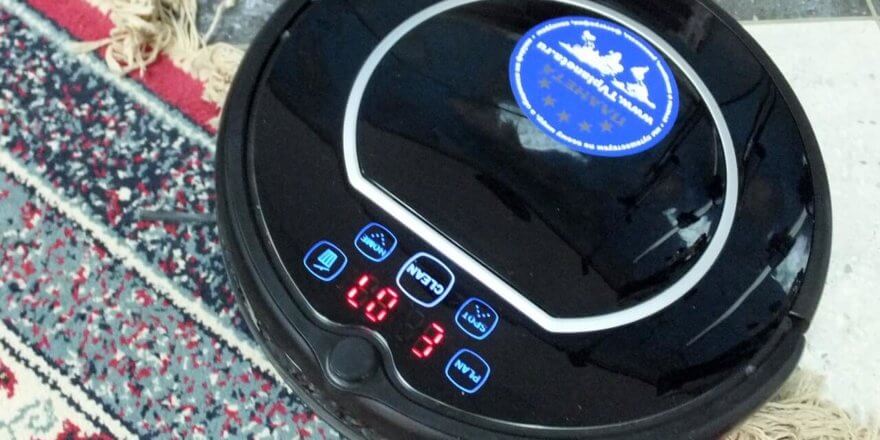
Regardless of brand, robotic vacuum cleaners can experience various errors. Any owner of an automated device will encounter this sooner or later, so don't be discouraged. If a malfunction occurs, its code is usually displayed on the display or indicated by audible signals. You can troubleshoot most errors yourself; all you need to know is what the codes mean. Today, we'll look at what to do when a robot vacuum cleaner displays an error, as well as troubleshooting tips for models from different manufacturers.
iRobot Robot Vacuum Cleaner Error Codes
Sound codes
| Number of sound pulses | Possible causes | Methods of elimination |
| 1 | The robot vacuum cleaner is stuck, one of the side wheels has fallen in/drooped | Move your robot and check that the wheels are touching the floor. After that, start iRobot again. |
| 2 | The main brushes do not rotate. | It is necessary to remove and clean the brushes from hair, wool and other debris. |
| 5 | The side wheel is blocked/does not rotate | The wheel must be cleaned of hair, wool, threads, and dirt. The drive wheel should rotate without difficulty. |
| 6 | The drop sensors are clogged or the device is stuck over a ledge | Wipe the sensors with a dry, lint-free cloth and re-run in a different location. |
| 7 | The device is locked | Lift the robot vacuum cleaner and check the condition of the side wheels; they should spin without difficulty. |
| 8 | The front swivel caster or robot vacuum cleaner is blocked | You need to remove and clean the swivel roller from dirt and restart the device in a different location. |
| 9 | The robot is blocked (the bumper is jammed or its sensors are dirty) | The bumper needs to be inspected and cleaned. |
| 11 | The vacuum cleaner does not detect obstacles for a long time and stops at a certain point | The device is likely located in a room with too much surface area. It is recommended to install a movement limiter. Also, try pressing the bumper several times to check its functionality. |
| 12 | The drop sensor is dirty or faulty | Check and clean the sensors |
About that, How to clean a robot vacuum cleaner We discussed this in a separate article. You might find the information provided useful. We also covered in detail How to troubleshoot a robot vacuum cleaner.
Light codes (when charging the battery)
| Number of red signal flashes | Possible reasons | Methods of elimination |
| 1 | The battery is not connected | Make sure the protective plate is removed from the robot vacuum cleaner. Open the bottom cover of the robot, remove and reinstall the battery. |
| 2.3 | The battery is not connected | Try charging your device again. If the problem persists, contact a service center. |
| 5 | Error during charging process | You need to reboot the device by pressing and holding the "SPOT" and "DOCK" buttons simultaneously for about ten seconds. If the problem persists, contact a service center. |
| 6 | The battery overheated | Allow the battery to cool down and then resume charging. |
| 7 | The robot's battery has become significantly overheated. | Allow the battery to cool to room temperature, then resume charging. If the problem persists, contact a service center. |
Voice messages
| Number of sound pulses | Possible reasons | Methods of elimination |
| Error 1 (left/right) | The robot vacuum cleaner is stuck, or the side wheel (left/right) is hanging down/falling through. | You need to move the robot vacuum cleaner and make sure the wheels are touching the floor. Then turn the robot back on. |
| Error 2 | The main brushes do not rotate. | It is necessary to remove and thoroughly clean the brushes from wound hair, wool, threads and other debris. |
| Error 5 | The drive wheel is blocked/does not turn | Since the drive wheel must rotate without difficulty, it must be cleaned of dirt. |
| Error 6 | The drop sensors are dirty or the device is stuck over a ledge. | The drop sensors must be wiped with a dry, lint-free cloth and the vacuum cleaner must be run again in a different location. |
| Error 7 | The device is locked | Lift the iRobot and check the condition of the drive wheels. |
| Error 9 | The robot is blocked (the bumper is jammed or its sensors are clogged) | The bumper needs to be inspected and cleaned. |
| Error 10 | The roller is stuck or the bumper does not see any obstacles. | The robot vacuum cleaner is probably in a room with too much surface area. It is necessary to install virtual wall to limit the cleaning area. If the space is not too large, try pressing the bumper several times to check its functionality. |
iClebo Robot Vacuum Cleaner Error Codes
| Message on the display | Cause | Solution option |
| C1 | The wheel is raised | It is necessary to move the vacuum cleaner to a flat surface. |
| C2 | Floor sensor malfunction | |
| C3 | Dust collector malfunction | Make sure that the dust container is installed in the device and is securely fastened. |
| C4 | Wheel overload | The wheel's operation is hampered by accumulated debris, hair, and wool; it needs to be cleaned. |
| C5 | Brush overload | The brush is not working properly due to debris that is stuck in it and needs to be cleaned. |
| C6 | Suction module overload | The dust collector needs to be cleaned and the filter replaced if necessary. |
| C7/CA in new motherboards | Internal system error / problem in the navigation module (camera) | Turn off the iClebo robot vacuum cleaner by switching the power button to the Off position, then turn it back on by pressing the On button. If the problem persists, contact customer service. |
| C8 | Front wheel odometer malfunction, wheel does not touch the floor | Remove the front roller and note the position of the magnetic disc on its axle: it should be facing outward. If it's installed upside down, remove it and reinstall it correctly. Also, clean the wheel or replace it if it's significantly damaged. To replace the odometer, contact a service center. |
Panda robot errors
Sensor error codes:
| Code | Possible reasons | Solution |
| E000 | There are no faults | — |
| E001 | Problems with the left altitude sensor | It is necessary to clean the sensors of the Panda robot with a dry cloth. |
| E002 | Problems with the upper left altitude sensor | |
| E004 | Problems with the upper right altitude sensor | |
| E008 | Problems with the right altitude sensor | |
| E00F | All altitude sensors are broken. | |
| E010 | Left infrared sensor failure | The glass inserts on the protective bumper need to be cleaned. |
| E020 | Right infrared sensor failure | |
| E040 | Front left infrared sensor failure | |
| E080 | Front right infrared sensor failure | |
| E0F0 | All infrared sensors are broken | |
| E100 | Problems with the left collision sensor | Inspect the robot vacuum cleaner's protective bumper |
| E200 | Problems with the right collision sensor | |
| E400 | The left wheel has no contact with the surface | The robot needs to be installed on a flat surface. |
| E800 | The right wheel has no contact with the surface |
Robot vacuum cleaner motor error codes:
| Code | Possible reasons | Solution |
| L000 | There are no faults | — |
| L001 | Right wheel overload | It is necessary to check whether the wheel is locked. |
| L002 | Left wheel overload | |
| L004 | Right brush overload | It is necessary to check whether the brush is blocked. |
| L008 | Left brush overload | |
| L010 | Cooling system overload | It is necessary to check whether the fan is blocked. |
Kitfort robot vacuum cleaner errors
| Code | Description of the malfunction | Recommendation |
| E01 | Left wheel failure | It is necessary to check whether the wheel can rotate freely and clean the part if necessary. |
| E02 | Right wheel failure | |
| E03 | Not applicable | — |
| E04 | The device is lifted from the floor, or one of the wheels is hanging down/falling through | The Kitfort robot vacuum cleaner needs to be installed on a level floor. |
| E05 | Lower sensors failure | The sensor windows should be wiped with a dry cloth. |
| E06 | Sensors in the protective bumper are broken. | Wipe the side surface of the protective bumper |
| E07 | Left side brush malfunction | It is necessary to remove the brush and clean it from accumulated debris. |
| E08 | Right side wiper blade malfunction | |
| E09 | The robot vacuum cleaner is stuck | Place the device on a flat surface. |
| E10 | Charging a switched-off robot | You need to turn on the robot by pressing the switch on the side |
| E12 | Not applicable | — |
| The dust container icon is flashing | The garbage collection container is full | The container and the suction module opening should be cleaned of debris. |
Samsung Robot Vacuum Cleaner Error Codes
| Code | Possible reasons | Solution |
| C00 | The robot is stuck | You need to turn off the device by pressing the button at the bottom of it, move it to another zone and then turn it on again |
| C01 | There is a foreign object stuck in the brush | You need to turn off the device by pressing the button at the bottom, remove the dust container, remove foreign objects from the brush and then turn on the robot. |
| C02 | There was a foreign object in the left wheel | You should turn off the vacuum cleaner by pressing the button at the bottom, remove the foreign object from the wheel and turn the device on again. |
| C03 | There was a foreign object in the right wheel | |
| C05 | Protective bumper sensor failure | You should turn off the robot vacuum cleaner by pressing the button at the bottom of it, remove the obstacle in front of the product, or move it to another part of the room, then turn it on |
| C06 | Foreign material has entered the sensor window | Turn off the device using the button located on its bottom side, wipe the windows of the front and rear sensors with a soft dry cloth, and turn it on again. |
| C07 | There was foreign material in the break sensor window. | |
| C08 | The dust collector is not installed | A dust collector should be installed in the vacuum cleaner. |
| C09 | There was a foreign object in the side brush in the "Along the Walls" mode | You need to turn off the device by pressing the button at the bottom, remove excess objects from the side brush, and turn on the robot vacuum cleaner. |
| Nobatt | Battery cable disconnected/bad | Turn off the device using the button located on the bottom, then turn it on again. If the problem persists, contact Samsung service. |
Common errors in iLife robots
We also included a table from the manual that lists the most common errors found in iLife robotic vacuum cleaners and how to fix them yourself:


iLife errors
That concludes this article. If you haven't found the error with your robot vacuum, please share it in the comments. We'll do our best to help you determine the cause and how to fix it. Your troubleshooting experience can also help our readers, so feel free to share your own situation below!
Hello! My Panda X500 robot vacuum cleaner won't start. Specifically, after pressing the "Clean" button, the vacuum's motor starts for 2 seconds and the side brushes begin to spin. After that, everything shuts off and the display shows error E007. Could you please tell me what could be causing this?
Same problem.
Did you manage to solve it?
When starting up, the ilife 55 robot vacuum cleaner shows error E 08 and switches off.
Check to see if the brushes are clogged. This is most likely the cause.
Good afternoon. Could you tell me what the error could be? Or should I take it straight to the service center? I've been using an Iclebo Pop for over three years. Now, within the first few minutes of use, it starts flashing and displays the AUTO+30 error (wheel motor overload). We took it apart and completely cleaned it of dust. After that, it worked for about 5 minutes and then displayed the same error.
My ILIFE vacuum cleaner keeps reversing and turning off, and the error code is E06. I've cleaned all the sensors and the bumper, but it didn't help... What should I do?
Hello, Lera. Please tell me if you found a solution to the problem. I have the same problem.
Hello! Have you solved this problem? It started giving the same thing. It also can't be controlled with the remote control when it starts glitching like this.
Good afternoon. My Iclebo Arte vacuum cleaner shuts off for a second after hitting an obstacle, then turns back on and continues working. The problem is that it considers each shutdown a reference point. And when the cleaning is complete, it considers the last location it turned off as its baseline.
The Panda vacuum cleaner moves away from the base and immediately turns around to recharge, error E 17
Hello, Boris! I'm having the same problem with my Panda X900 Wet Clean (aka B2005 PLUS). I couldn't find a description of this error code (E17). I've already cleaned the robot vacuum completely, rebooted it with the battery disconnected, and that didn't help. Could these be two overlapping errors? E10 and E07? Did you manage to figure it out?
Panda x600 vacuum cleaner. After starting, it moves away from the base, then stops and turns off. The display shows error E007. I couldn't find anything about it in the manual. The battery is fresh, the bumper is clean. What's wrong?
To the trash?
ILife v55 at the end of charging, error E10 appears (power switch in position O), although the switch is in position I. As a result, the vacuum cleaner cannot complete charging.
Boris, have you found a solution? I encountered the same problem.
Good afternoon. I have a Mideo 16 robot. The display shows RU8F. It switches to spot cleaning in any mode, sometimes returns to the program, then starts spinning again. Could you tell me what the error is and how to fix it?
Panda vacuum cleaner, error Lo, discharged, I put it on charge, it gives this error, then Clean lights up, and turns off completely
Hello! It might be a sensor issue. When you hold down the clean button, it lights up for a couple of seconds.
and the robot turns off, but the problem could be in the board or with the power supply.
Good afternoon! I have a Genio deluxe 500, it's on the docking station and active. I try to turn it on, but it refuses to work. The house icon lights up again. I take it off the docking station and it's completely dead. I also have an iLife robot for my daughter. It's identical. Thanks for your reply.
Hello! The problem may be with the battery, or that you haven't turned on the robot vacuum cleaner.
Try turning on the robot vacuum cleaner. If that doesn't help, then the battery is dead.
Hello! My Bist vacuum cleaner is displaying an E006 error! I've cleaned everything, but it still leaves the base for a few seconds and stops.
Please tell me
Tefal robot vacuum cleaner
It returns error e-11
Hello, please tell me, I have the same problem, did you find an answer to what the cause is???
There's a manual on tefal_ru. Search for "RG7145" and find "safety instructions" at the bottom of the page.
E-11 bumper error. This means the front obstacle contact sensor is broken. Mine was heavily clogged with dust.
The ILIFE v80 robot vacuum cleaner displays error code E22 when it hits a carpet. What could this be?
My new iLife V30 Pro vacuum cleaner beeps and three lights on the base blink after charging. When I remove it from the base, it dies completely. What could be wrong?
Hello. My ILIFE V55pro vacuum cleaner displays "Lo!" and then stops working. Could you please tell me what this means?
Hello, have you found a solution to the problem? We have the same problem.
To clear the "Lo" message (indicating that the battery is completely empty), charge the vacuum directly without the base. This means unplugging the power cord from the base and plugging it into the vacuum while it's off. There's a socket near the power switch for plugging it directly into the vacuum without the base.
The instructions say: "Lo—the battery is almost empty and needs to be charged soon." The Lo notification appeared during cleaning, and the vacuum stopped immediately. It refused to return to its base, so I manually placed it there. It wouldn't charge; the display simply turned off and that was it.
Have you found a solution to the problem? I have exactly the same problem.
I've been using the Bist Tornado robot vacuum cleaner for two days and it's showing an E0-10 error. I've cleaned everything, but nothing's working. What should I do?
Hello. My ILIFE A8 vacuum cleaner runs for a few minutes and then turns off, the red light is on. It says something in English, but no one can understand it. Something like "Please check all noises."
I kindly request your help in resolving this issue and thank you in advance for your response. After a few minutes of operation (the clean water tank is full, the dirty water tank is empty), the iLife W400 robot vacuum cleaner stops without making any sound. Two red indicators (the "Drip" and "CLEAN" indicators) and an orange "I" indicator light illuminate on the lid. I manage to turn it off and then restart it after several attempts, but the result is the same.
My Panda x600 pro robot vacuum cleaner runs for a few seconds after being turned on, but doesn't move. It displays E000 and L003. What does this mean and what should I do?
The ILIFE-V55 Pro robot vacuum cleaner displays error code E12. What is this?
Have you solved the problem?
I also have error E12. How can I solve the problem?
I had the same error. How I fixed it:
1. I unscrewed the brushes and there was hair stuck in them (I removed it).
2. I took out the battery and disconnected it for a couple of minutes.
3. Wiped all sensors.
And the vacuum cleaner seemed to work.
Could you please tell me? Our iLife V55 robot vacuum cleaner has been running for a month and now it's showing error 5137. What does this mean? What should I do?
Hello! My iLife Pro 55 vacuum cleaner is displaying an E06 error. The manual says there might be a problem with the bumper or the collision sensor. I took the bumper apart and cleaned it, but nothing helped! How can I fix this error? Please tell me.
When starting any program in the washing mode, the ILife W400 vacuum cleaner makes two rotations around itself and stops, indicating completion.
However, it doesn't follow the program's trajectory and doesn't wash. Recharging, cleaning the tanks, scraper, filter, and roller don't help. What's the problem and how can I fix it? Has anyone encountered this?
A6 vacuum cleaner. When docked, the red light is on (non-flashing) and a double beep sounds continuously.
When removed from the base, the lamp does not light, and the vacuum cleaner does not respond to any button presses on the body or remote control.
The ILIFE A4s vacuum cleaner works well, but when it's on the base, it cycles through the lights (yellow, green, red, and a beep), then repeats the sequence over and over again. What's the problem?
Hello. My Ilife v55 vacuum cleaner is displaying error code E10, beeping twice, and then shutting off. What could be the problem?
I have the same problem. Did you figure out what the error is and how to fix it?
Hello!!!!!! My Ilife a9s robot vacuum cleaner is displaying a bumper error. I've disassembled it, and the sensors are clean, everything is clean. Could you tell me what the problem is and what to do?
Robik started showing the "Lo" error! What does this mean? Can anyone tell me?
Charge the robot vacuum. It should come with a cord and charging base. The robot can be connected to the charger either directly or through the base. "Lo" isn't an error, but a message indicating the vacuum's battery is low. And yes, there are errors in your comment.
Hello, my Ilife A7 robot vacuum cleaner is displaying error code E12. It seems to be related to the right wheel, which sometimes doesn't spin. What can I do?
Hello, please tell me how to fix this error.
The Deebot ecovacs robot won't start. It says it's not touching the floor, even though it's on the floor. We've wiped everything down, cleaned it, and checked all the wheels. Everything seems to be working as usual, including turning it on and off. I've resynchronized it, but that didn't help. What could be wrong?
My Redmond RV-R500 robot vacuum cleaner displays the error codes L020 and E000. It runs for a couple of seconds and then stops. Could you tell me what's wrong? Thank you.